Private S3, public CDN: CloudFront OAC for media uploads
A walkthrough of wiring cover uploads behind a private bucket and CloudFront OAC — using a fictional newsroom, Northlight Press, as the demo.
Imagine Northlight Press: a small digital newsroom with an Admin desk for stories and a public site for readers. Desk needs to upload article covers without opening the bucket to the world. Readers need those images on a clean hostname that works in an <img> tag.
The shape that works is common — presigned PUT into a private S3 bucket, served only through CloudFront with Origin Access Control (OAC) — but the debugging path is where most of the craft sits.
Demo hostnames for this write-up:
- Staging:
cdn-dev.northlight.press - Production:
cdn.northlight.press
The product requirement
An editor uploads a cover in Admin. The browser must never hold long-lived AWS keys. The object must not be world-readable on S3. The reader site should still get a stable HTTPS URL.
That rules out:
- Public-read ACLs on every object
- Storing temporary signed read URLs in the database (they expire)
- Pointing the frontend at the raw
s3.amazonaws.comURL when Block Public Access is on
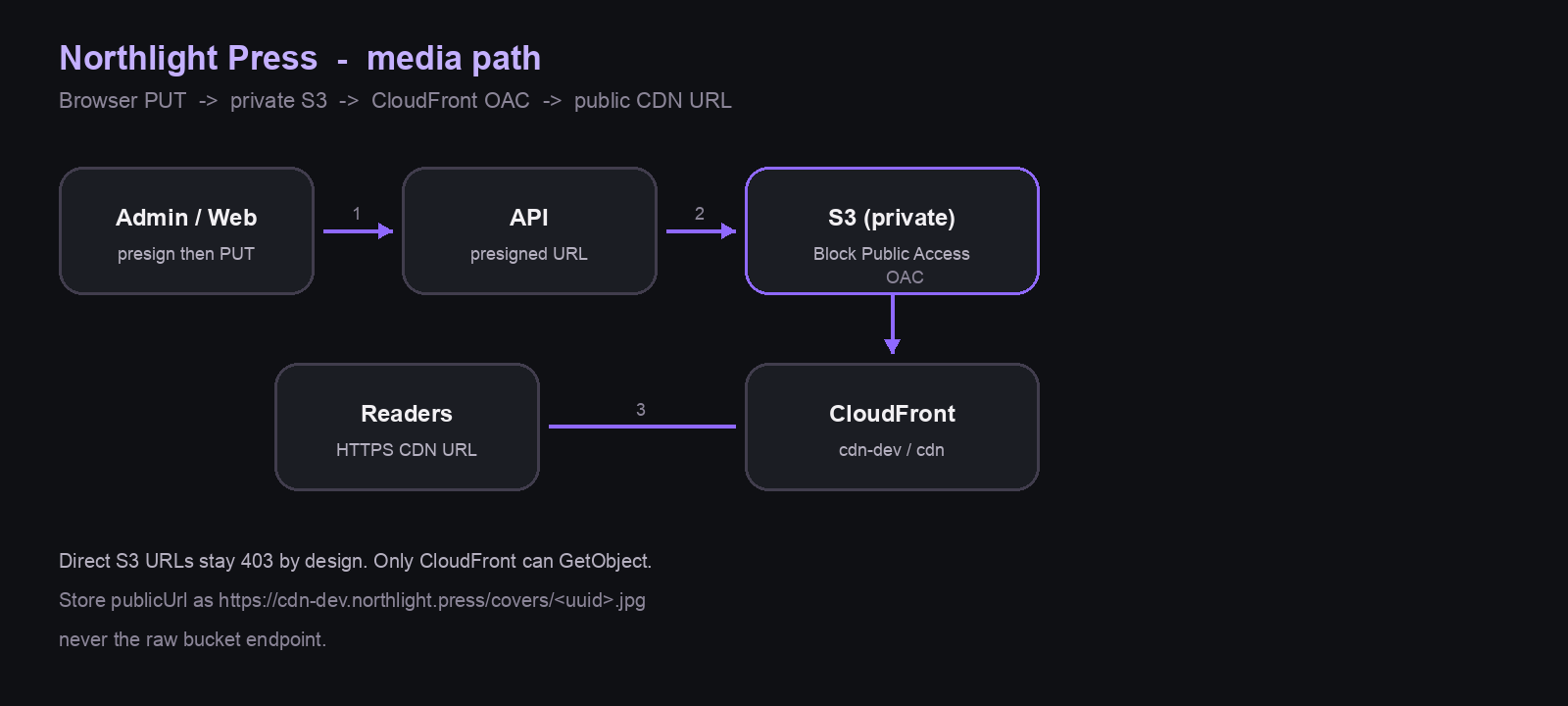
The write path (presigned PUT)
- Admin asks the API for a presigned URL (
POST /aws/presigned-url) with content type and folder (covers/…). - The API builds a key like
covers/<uuid>.jpg, signs a PUT with the AWS SDK, and returns{ uploadUrl, publicUrl, headers }. - The browser PUTs the file bytes straight to S3.
- Admin saves the story with
coverImage = publicUrl.
Details that usually bite:
- Sign
Content-Typeand send the same header on PUT. Mismatch → 403. - Turn off SDK “always checksum” behavior for browser PUTs. Extra
x-amz-checksum-*query params are a frequent CORS / signature trap. Prefer checksums only when required. - Bucket CORS must allow PUT from your Admin origins (
localhost, staging, prod). A healthy API does not fix a browser CORS failure.
The read path (private bucket + OAC)
S3 stays locked down: Block Public Access on, no Principal: "*" GetObject.
CloudFront sits in front with Origin Access Control. The bucket policy allows s3:GetObject only for that distribution’s OAC identity. Readers hit:
- Staging:
https://cdn-dev.northlight.press/covers/….jpg - Prod:
https://cdn.northlight.press/covers/….jpg
The API builds publicUrl from env, not from the bucket website endpoint:
AWS_S3_PUBLIC_DOMAIN=cdn-dev.northlight.press
So the DB stores CDN URLs. Restart the API after env changes, or Admin keeps writing old hostnames.
DNS that looks “wrong” until it isn’t
For cdn-dev, the DNS record is a CNAME (or Alias) to the distribution domain (xxxx.cloudfront.net), not the distribution ID. Confusing the two produces NXDOMAIN while CloudFront itself is fine.
Failure modes that look like frontend bugs
1. Brand placeholder instead of the cover
A CoverImage (or equivalent) often falls back to brand art when the CDN URL errors (403/404). That is correct UX — and a terrible debugging signal if you assume the UI ignored coverImage.
Open the URL in a tab. XML AccessDenied means it is not a React bug.
2. “Fallback to the bucket URL”
Tempting. Useless with this policy. Direct S3 GetObject is also 403 for working keys, because only CloudFront may read. A bucket fallback cannot save a missing or private object.
3. DB has a publicUrl, object doesn’t exist
Presign + save without a successful PUT (or a wrong key) leaves a beautiful CDN URL that 403s forever. Desk fix: re-upload, watch the PUT succeed, confirm the CDN URL renders as an image, then save.
4. One key works, one doesn’t
Same distribution, same OAC, same CORS. That almost always means this object isn’t there / isn’t readable, not “CDN is broken.” Compare a known-good cover key (200) with the failing one (403).
What I’d tighten next
- Only persist
coverImageafter the browser PUT returns success - Surface upload failure in Admin instead of silently storing a dead URL
- Keep staging and prod media on separate buckets (or at least separate prefixes + distributions) so desk experiments never leak into production CDN cache assumptions
Takeaway
Private S3 + CloudFront OAC is a solid default for editorial media: uploads stay credential-light, the bucket stays closed, readers get a fast hostname. Most “CDN bugs” in a Northlight-style setup are really DNS shape, presign/CORS details, or a publicUrl pointing at an object that never landed — with a polite UI fallback hiding the evidence until you open the URL.